This is default featured slide 1 title

Go to Blogger edit html and find these sentences.Now replace these sentences with your own descriptions.

This is default featured slide 2 title

Go to Blogger edit html and find these sentences.Now replace these sentences with your own descriptions.

This is default featured slide 3 title

Go to Blogger edit html and find these sentences.Now replace these sentences with your own descriptions.

This is default featured slide 4 title

Go to Blogger edit html and find these sentences.Now replace these sentences with your own descriptions.

This is default featured slide 5 title

Go to Blogger edit html and find these sentences.Now replace these sentences with your own descriptions.

Showing posts with label Corel Draw. Show all posts

Creating Vector Image Using Corel Draw

Vector picture is a picture which made from line and curve. Assembly from line and curve would make some an object. It's like a cartoon image. To create Vector Image not very hard. But you must diligent and hard working to make various image.

Vector Image can be made from your digital image. It's very simple as long as you know the steps. Vector Image from digital image have their own fans. It made your digital image or photo looks like a cartoon and you can put it in social network.

We'll try to explain how to make vector image from digital image using Corel Draw.

1. At the first you must know how to make Posterize effect using Corel Photo Paint. Why must be like that? Posterize effect help us to determine the line and border from one color to another. If you don't know to create Posterize please click here. Usually, we use 10 level in Posterize just like in the tutorial.

Posterize using Corel Photo Paint
 2. Open your Corel Draw. And then Open your digital image which already Posterize. Remember, in Corel Draw you can't open a JPEG image. So, at first you must create a new page. And then you must import your digital image.
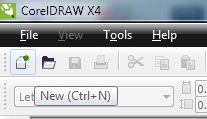
New

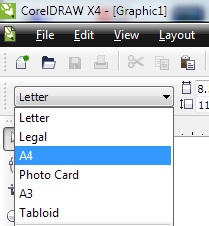
Choose Paper
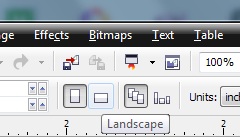
Choose Portrait or Landscape
Import your digital Image
3. Choose Pen on the left bar. And make line due the line from line on your Posterize digital image. All line on Posterize image must be lined using Pen. After that you can colored it with left click to choose color in the right bar Corel Draw
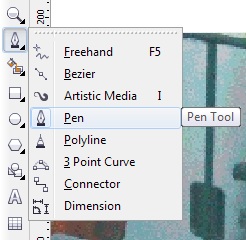
Pen
 
Make lines using Pen
4. You can create colored, black and white or another color to your vector digital image. And then you can save it.

vector image in black and white
vector image in blue

Corel Draw and Corel Photo Paint

In this century, people can't separated from digital image or in other words photo. Even, handphone with camera can take picture and then upload it to social network easily. But camera in handphone no as good as camera DSLR. So, people can use digital image editor to enhanced it. And don't forget, digital image editor more involved to be better, from now on. Because they knew, everyone interesting in digital image or photo to capture their moment.


If you used Core, there are two product in Corel that usually used to enhanced  digital image. Corel Draw and Corel Photo Paint. Although Corel Draw can enhanced our digital image, but it better if using for design.
Different from Corel Draw, Corel Photo Paint more used for enhanced our digital image. We can say digital image editor or photo editor. Just like the other offline digital image editor, Corel offering some of tools to enhanced our digital image to be more attrative.

If you already have Corel Draw and Corel Photo Paint, you can compare it. Wich one better to enhanced digital image. I believe Corel Photo Paint. Some time you can combine Corel Draw and Corel Photo Paint. You can put some ornamen to your digital image using Corel Draw. Or you can creat vektor digital image using Corel Draw so easily. It's some excess from Corel Draw.

Different from Corel Draw, Corel Photo Paint very easy for ehanced our digital image. For example, make black and white, add saturation, color enhanced and others. Because every tools in Corel Photo Paint designed for digital image editor. Corel Photo Paint very easy to used to. You can learn it step by step or just try left klik the tools.